

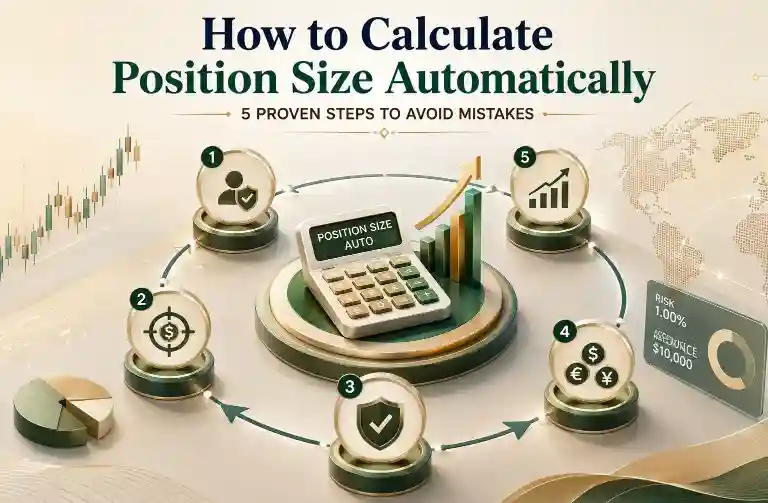
Learning how to calculate position size automatically removes one of the most common sources of trading error — manual lot size mistakes made under pressure. Instead of estimating position size on the fly, a proper automatic calculation ties your risk percentage, stop-loss distance, and account balance together into one reliable number every time. This guide walks through the exact formula, five proven steps to apply it, and how to build a simple calculator you can reuse on every trade.
Whether you’re trading a small personal account or working through a prop firm evaluation with strict drawdown rules, the underlying math doesn’t change — only the risk percentage and drawdown buffer you choose to work within. Getting this calculation right once, and automating it so it repeats consistently, is one of the highest-leverage habits a trader can build early.
The Core Position Size Formula
At its foundation, automatic position sizing relies on one formula:
Position Size = (Account Balance × Risk %) ÷ (Stop-Loss in Pips × Pip Value)

Every method for calculating position size automatically — whether a spreadsheet, a built-in platform calculator, or a custom script — is really just this formula applied consistently, with the stop-loss distance and pip value updated for each specific trade.
5 Proven Steps to Calculate Position Size Automatically
Step 1: Define Your Risk Percentage Per Trade
Before any calculation can happen, you need a fixed risk percentage — commonly 0.5% to 2% of account balance per trade. This number should stay constant across trades rather than shifting based on how a setup “feels.”
Step 2: Determine Your Stop-Loss Distance
Your stop-loss distance in pips is set by your technical analysis, not by how much you’re willing to lose. Once you know exactly where your stop belongs on the chart, the pip distance from your entry becomes a fixed input into the formula.
Step 3: Calculate Pip Value for Your Pair
Pip value differs by currency pair and by lot size, so this figure needs to be recalculated for each trade if you’re switching pairs. Most platforms display this automatically, but understanding how it’s derived helps when building your own calculator.
Step 4: Use a Position Size Calculator or Spreadsheet Formula
Rather than doing this math manually on every trade, feeding these three inputs — risk %, stop-loss pips, and pip value — into a spreadsheet formula or dedicated calculator automates the entire process. This is the step that actually makes position sizing “automatic” rather than just consistent.
Step 5: Double-Check Against Broker Lot Size Limits
Automated calculations sometimes produce a lot size below a broker’s minimum or above a practical maximum for your account. Always sanity-check the output against your broker’s actual lot size increments before placing the trade.
Building a Simple Calculator to Automate Position Size
A basic Google Sheets or Excel formula can help you calculate position size automatically for every trade. With account balance in cell A1, risk percentage in A2 (as a decimal), stop-loss in pips in A3, and pip value in A4, the formula is:
=(A1*A2)/(A3*A4)Once the spreadsheet is set up, you only need to update the stop-loss distance for each new trade, and the position size recalculates instantly without any manual calculations. Some traders also link pip values to a lookup table for different currency pairs, allowing the spreadsheet to calculate position sizes automatically across multiple instruments.
How Volatility Affects Automatic Position Sizing
A fixed pip stop-loss doesn’t account for how much a pair is actually moving on a given day. Many traders improve their automatic position sizing by basing the stop-loss distance itself on a volatility measure like ATR, rather than a flat number of pips. This means the position size calculation adjusts naturally during high-volatility periods without requiring a manual override. Our guide on how to use ATR in forex trading explains exactly how to incorporate this into your stop-loss and, by extension, your position size formula.
Automatic Position Sizing Across Multiple Open Trades
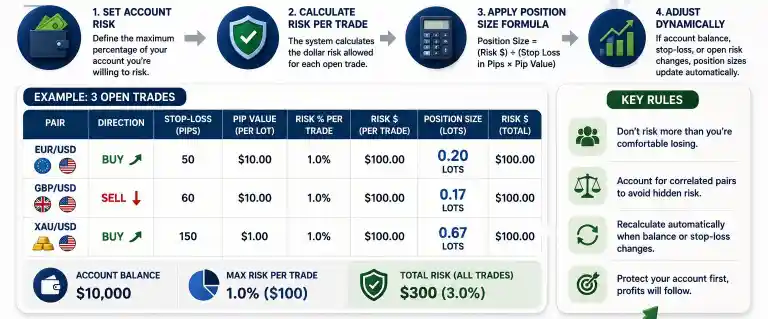
Learning to calculate position size automatically becomes even more important when managing multiple open trades. A single-trade formula works well in isolation, but traders who hold more than one position at a time also need to consider the combined exposure of correlated currency pairs. For example, if you’re long on two pairs that tend to move together, your overall risk may be much higher than each trade’s individual calculation suggests, even if both positions stay within your chosen risk percentage.
One practical way to calculate position size automatically is to build a running total of open risk into the same spreadsheet or calculator used for individual trades. By subtracting already-committed risk from your available risk budget before opening a new position, you can better manage total account exposure instead of treating every trade as an independent setup.
When Not to Rely Solely on Automatic Calculations
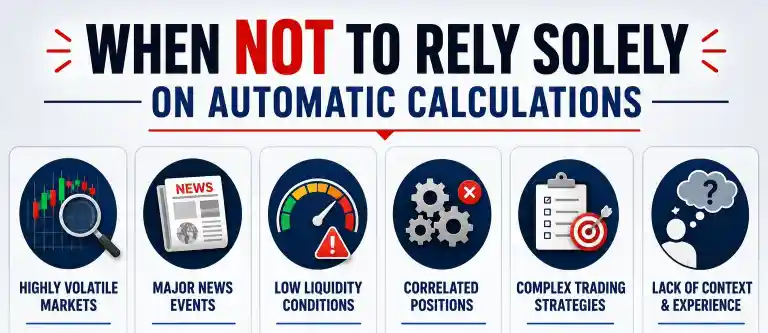
The ability to calculate position size automatically can help eliminate mathematical errors, but it should not replace trading judgment. An automatic position size is only as accurate as the information used to calculate it. If your stop-loss is placed in the wrong location, even a perfectly calculated position size will still be based on a poor trade setup. Position sizing tools help manage risk, but they cannot replace sound technical analysis.
Likewise, during periods of low liquidity or ahead of major economic news, actual execution prices may differ from the level used in your calculation, which can increase or reduce your realized risk. Traders who calculate position size automatically should treat the result as a well-informed estimate rather than a guaranteed outcome and always consider current market conditions before placing a trade.
Common Mistakes When Calculating Position Size
- Using yesterday’s account balance: Position size should always be calculated from your current balance, not a stale number from before recent trades closed.
- Forgetting to update pip value per pair: Applying the same pip value across different currency pairs produces meaningfully wrong position sizes.
- Rounding stop-loss distance too aggressively: Small rounding errors in pip distance can meaningfully shift the risk percentage actually taken on a trade.
- Manually overriding the calculator “just this once”: The entire point of automating position size is consistency — overriding it defeats the purpose and usually happens exactly when discipline matters most.
Tracking Position Sizing Accuracy Over Time
Even with an automated formula, it’s worth periodically checking whether your actual realized risk per trade matches your intended risk percentage. Keeping a simple trading journal that logs intended risk versus actual risk taken can reveal small systematic errors — such as consistently rounding lot sizes up — before they compound into a larger problem. Our guide to trading journal metrics covers what’s worth tracking alongside your standard win/loss data.
Final Thoughts
Knowing how to calculate position size automatically makes position sizing a consistent part of your trading routine rather than a source of hesitation or calculation errors. Whether you use a spreadsheet or a dedicated position size calculator, the goal is the same: reduce manual calculations and apply the same level of risk to every trade.
When you calculate position size automatically, you can spend less time on calculations and more time focusing on trade selection, market analysis, and managing open positions. Consistent position sizing helps create a more disciplined approach to long-term risk management.
FAQs
What’s the safest risk percentage to use per trade?
Most traders use between 0.5% and 2% of account balance per trade, with more conservative traders and those in evaluation-style challenges often staying at the lower end of that range. Knowing how to calculate position size automatically around this fixed percentage is what actually makes the risk limit meaningful in practice.
Do I need special software to calculate position size automatically?
No. A basic spreadsheet formula is enough to automate the calculation — many trading platforms also include a built-in position size calculator that does the same thing without any manual setup required.

